Recording Video Activity
Now that we have set up our constants in Part-I let us start with our Recording process.
First, let us start by creating an interface that will use throughout the life cycle of RecordActivity.kt:
class IRecord {

    interface ViewRecord{
        fun toggleCamera()
        fun initFrontCamera()
        fun initBackCamera()
        fun startRecording()
        fun stopRecording()
        fun recordVideo()
        fun initVideoNameDialog()
    }

    interface PresenterRecord{
        fun getVideoTask(file: File, context: Context, vidName:String,simpleVideoView: SimpleVideoView)
    }
}
Now to our presenter that will do the saving that will use on our activity. Notice that there to mappings. feedMapper will be under the personal saves of the current user. Even if it is closed to sharing it will still be used for the current users. uploadMapper will be used globally and be visible for every user that is using the app.
class RecordPresenter : IRecord.PresenterRecord {

    override fun getVideoTask(
        file: File,
        context: Context,
        vidName: String,
        simpleVideoView: SimpleVideoView
    ) {
        val uri = Uri.fromFile(file)

        val feedRef = "UserFeed/Video/${AppUser.getUserId()}"
        val uploadsRef = "uploads/Shareable"
        val timeDate = DateFormat.getDateTimeInstance().format(Date())
        val millis = System.currentTimeMillis().toString()
        val feedPush = Constants.fFeedRef.push()
        val pKey = feedPush.key.toString()

        val fUploadsStorageRef =
            FirebaseStorage.getInstance().reference.child("uploads/${AppUser.getUserId()}")
                .child("Videos")
                .child(System.currentTimeMillis().toString() + ".mp4")

        try {
            val uploadTask = fUploadsStorageRef.putFile(uri)
            uploadTask.continueWith {
                if (!it.isSuccessful) {
                    it.exception?.let { t -> throw t }
                }
                fUploadsStorageRef.downloadUrl
            }.addOnCompleteListener {
                if (it.isSuccessful) {
                    showToast(context, "Recording Ended")
                    val a = it.result.toString()
                    it.result!!.addOnSuccessListener { uploadTask ->
                        val videoUrl = uploadTask.toString()
                        showToast(context, "Saving to Video View.")
                        feedMapper(pKey, timeDate, millis, videoUrl, feedRef, vidName)
                        uploadMapper(pKey, timeDate, millis, videoUrl, uploadsRef, vidName)
                        simpleVideoView.start(videoUrl)
                    }.addOnFailureListener {
                        showToast(context, "Uploading error.")
                    }
                } else {
                    showToast(context, "Get Task error.")
                }
            }
        } catch (e: Exception) {
            e.message?.let { showToast(context, it) }
        }
    }

    private fun feedMapper(
        pKey: String,
        timeDate: String,
        timeMillis: String,
        vidUrl: String,
        feedPath: String,
        vidName: String
    ) {
        val feedMap: MutableMap<String, String> = HashMap()

        feedMap["shareStat"] = "1"
        feedMap["like"] = "0"
        feedMap["timeDate"] = timeDate
        feedMap["timeMillis"] = timeMillis
        feedMap["uploaderId"] = AppUser.getUserId()
        feedMap["videoUrl"] = vidUrl
        feedMap["videoName"] = vidName

        val mapFeed: MutableMap<String, Any> = HashMap()
        mapFeed["$feedPath/$pKey"] = feedMap
        FirebaseDbHelper.rootRef().updateChildren(mapFeed)
    }

    private fun uploadMapper(
        pKey: String,
        timeDate: String,
        timeMillis: String,
        vidUrl: String,
        uploadPath: String,
        vidName: String
    ) {
        val uploadMap: MutableMap<String, String> = HashMap()

        uploadMap["like"] = "0"
        uploadMap["timeDate"] = timeDate
        uploadMap["timeMillis"] = timeMillis
        uploadMap["uploaderId"] = AppUser.getUserId()
        uploadMap["videoUrl"] = vidUrl
        uploadMap["videoName"] = vidName

        val mapUpload: MutableMap<String, Any> = HashMap()
        mapUpload["$uploadPath/$pKey"] = uploadMap
        FirebaseDbHelper.rootRef().updateChildren(mapUpload)
    }
}
Now to design our RecordActivity.kt:
<androidx.constraintlayout.widget.ConstraintLayout xmlns:android="http://schemas.android.com/apk/res/android"
    xmlns:app="http://schemas.android.com/apk/res-auto"
    xmlns:tools="http://schemas.android.com/tools"
    android:layout_width="match_parent"
    android:layout_height="match_parent"
    tools:context=".ui.activities.RecordActivity">

    <androidx.camera.view.PreviewView
        android:id="@+id/camera_view"
        android:layout_width="match_parent"
        android:layout_height="match_parent"
        app:layout_constraintBottom_toBottomOf="parent"
        app:layout_constraintEnd_toEndOf="parent"
        app:layout_constraintHorizontal_bias="0.0"
        app:layout_constraintStart_toStartOf="parent"
        app:layout_constraintTop_toTopOf="parent"
        app:layout_constraintVertical_bias="1.0" />

    <LinearLayout
        android:layout_width="match_parent"
        android:layout_height="70dp"
        android:background="@color/just_fade"
        android:elevation="3dp"
        android:orientation="horizontal"
        android:weightSum="7"
        app:layout_constraintBottom_toBottomOf="parent"
        app:layout_constraintEnd_toEndOf="parent"
        app:layout_constraintStart_toStartOf="parent">

        <Space
            android:layout_width="0dp"
            android:layout_height="match_parent"
            android:layout_weight="1" />

        <com.google.android.material.card.MaterialCardView
            android:layout_width="0dp"
            android:layout_height="match_parent"
            android:layout_margin="10dp"
            android:layout_weight="1"
            android:clickable="true"
            android:focusable="true"
            android:foreground="@drawable/round_ripple"
            app:cardBackgroundColor="@color/darker_fuchsia"
            app:cardCornerRadius="60dp">

            <com.klinker.android.simple_videoview.SimpleVideoView
                android:id="@+id/recorded_video"
                android:layout_width="match_parent"
                android:layout_height="match_parent"
                app:muted="true"
                app:showSpinner="false"
                app:stopSystemAudio="false" />

        </com.google.android.material.card.MaterialCardView>

        <Space
            android:layout_width="0dp"
            android:layout_height="match_parent"
            android:layout_weight="1" />

        <com.google.android.material.card.MaterialCardView
            android:id="@+id/record_btn"
            android:layout_width="0dp"
            android:layout_height="match_parent"
            android:layout_margin="10dp"
            android:layout_weight="1"
            android:animateLayoutChanges="true"
            android:clickable="true"
            android:focusable="true"
            android:foreground="@drawable/round_ripple"
            app:cardBackgroundColor="@color/white"
            app:cardCornerRadius="60dp">

            <ImageView
                android:id="@+id/record_img"
                android:layout_width="match_parent"
                android:layout_height="match_parent"
                android:layout_margin="10dp"
                android:contentDescription="@string/record_video"
                android:padding="3dp"
                android:src="@drawable/ic_stop_video" />

        </com.google.android.material.card.MaterialCardView>

        <Space
            android:layout_width="0dp"
            android:layout_height="match_parent"
            android:layout_weight="1" />

        <com.google.android.material.card.MaterialCardView
            android:id="@+id/toggle_camera"
            android:layout_width="0dp"
            android:layout_height="match_parent"
            android:layout_margin="10dp"
            android:layout_weight="1"
            android:clickable="true"
            android:focusable="true"
            android:foreground="@drawable/round_ripple"
            app:cardBackgroundColor="@color/darker_fuchsia"
            app:cardCornerRadius="60dp">

            <ImageView
                android:layout_width="match_parent"
                android:layout_height="match_parent"
                android:layout_margin="10dp"
                android:layout_weight="1"
                android:contentDescription="@string/rotate_camera"
                android:src="@drawable/ic_rotate"
                app:tint="@color/white" />

        </com.google.android.material.card.MaterialCardView>

        <Space
            android:layout_width="0dp"
            android:layout_height="match_parent"
            android:layout_weight="1" />

    </LinearLayout>

</androidx.constraintlayout.widget.ConstraintLayout>
For our activity let’s first define our properties:
class RecordActivity : AppCompatActivity(), IRecord.ViewRecord, LifecycleOwner {

    private lateinit var binding: ActivityRecordBinding
    private lateinit var outputDirectory: File

    private lateinit var cameraProviderFuture: ListenableFuture<ProcessCameraProvider>
    private lateinit var cameraSelector: CameraSelector
    private lateinit var videoPreviewView: Preview
    private lateinit var cameraControl: CameraControl
    private lateinit var cameraInfo: CameraInfo

    private lateinit var dialog :Dialog

    private lateinit var dCancel: ImageButton
    private lateinit var dAccept: ImageButton
    private lateinit var dVidName: TextInputEditText

    //    private lateinit var videoCapture: VideoCapture
    private val executor = Executors.newSingleThreadExecutor()

    private lateinit var videoCapture: VideoCapture

    private var isRecording = false

    private var isFrontFacing = true

    private var camera: Camera? = null

    private val recPresenter: RecordPresenter by lazy {
        RecordPresenter()
    }
…
}
Before starting know that, dear reader, CameraX is still is on alpha stage so any method that binds us to that library will be on experimental mode and will require @SuppressLint(“RestrictedApi”) annotation as a start. Now, let’s look at our overridden methods starting with:
- initFrontCamera() :
override fun initFrontCamera() {
    CameraX.unbindAll()
    outputDirectory = Constants.getOutputDirectory(this)
    videoPreviewView = Preview.Builder().apply {
        setTargetAspectRatio(AspectRatio.RATIO_16_9)
        setTargetRotation(binding.cameraView.display.rotation)
    }.build()

    cameraSelector =
        CameraSelector.Builder().requireLensFacing(CameraSelector.LENS_FACING_FRONT).build()

    val videoCaptureCfg = VideoCaptureConfig.Builder().apply {
        setTargetRotation(binding.cameraView.display.rotation)
        setCameraSelector(cameraSelector)
        setTargetAspectRatio(AspectRatio.RATIO_16_9)
    }
    videoCapture = VideoCapture(videoCaptureCfg.useCaseConfig)

    cameraProviderFuture.addListener({
        val cameraProvider = cameraProviderFuture.get()
        camera = cameraProvider.bindToLifecycle(
            this,
            cameraSelector,
            videoPreviewView,
            videoCapture
        )
        cameraInfo = camera?.cameraInfo!!
        cameraControl = camera?.cameraControl!!
        binding.cameraView.preferredImplementationMode =
            PreviewView.ImplementationMode.TEXTURE_VIEW
        videoPreviewView.setSurfaceProvider(binding.cameraView.createSurfaceProvider(cameraInfo))
    }, ContextCompat.getMainExecutor(this.applicationContext))
}- initBackCamera():
override fun initBackCamera() {
    CameraX.unbindAll()
    outputDirectory = Constants.getOutputDirectory(this)
    videoPreviewView = Preview.Builder().apply {
        setTargetAspectRatio(AspectRatio.RATIO_16_9)
        setTargetRotation(binding.cameraView.display.rotation)
    }.build()

    cameraSelector =
        CameraSelector.Builder().requireLensFacing(CameraSelector.LENS_FACING_BACK).build()

    val videoCaptureCfg = VideoCaptureConfig.Builder().apply {
        setTargetRotation(binding.cameraView.display.rotation)
        setCameraSelector(cameraSelector)
        setMaxResolution(Size(1080, 2310))
        setDefaultResolution(Size(1080, 2310))
    }

    videoCapture = VideoCapture(videoCaptureCfg.useCaseConfig)

    cameraProviderFuture.addListener({
        val cameraProvider = cameraProviderFuture.get()
        camera = cameraProvider.bindToLifecycle(
            this,
            cameraSelector,
            videoPreviewView,
            videoCapture
        )
        cameraInfo = camera?.cameraInfo!!
        cameraControl = camera?.cameraControl!!
        binding.cameraView.preferredImplementationMode =
            PreviewView.ImplementationMode.TEXTURE_VIEW
        videoPreviewView.setSurfaceProvider(binding.cameraView.createSurfaceProvider(cameraInfo))
    }, ContextCompat.getMainExecutor(this.applicationContext))
}- initVideoNameDialog() :
override fun initVideoNameDialog() {
    dialog = Dialog(this,R.style.BlurTheme)
    val width = ViewGroup.LayoutParams.MATCH_PARENT
    val height = ViewGroup.LayoutParams.WRAP_CONTENT
    dialog.window!!.setLayout(width, height)
    dialog.window!!.attributes.windowAnimations = R.style.DialogSlide
    dialog.setContentView(R.layout.dialog_video_name)
    dialog.setCanceledOnTouchOutside(true)

    dCancel = dialog.findViewById(R.id.d_close_dialog)
    dAccept = dialog.findViewById(R.id.d_accept_name)
    dVidName = dialog.findViewById(R.id.d_vid_name)
}- startRecording() :
override fun startRecording() {
    val file = Constants.createFile(
        outputDirectory,
        Constants.FILENAME,
        Constants.VIDEO_EXTENSION
    )
    videoCapture.startRecording(
        file,
        executor,
        object : VideoCapture.OnVideoSavedCallback {
            override fun onVideoSaved(file: File) {
                Handler(Looper.getMainLooper()).post {
                    showToast(this@RecordActivity, file.name)
                    recPresenter.getVideoTask(
                        file,
                        this@RecordActivity,
                        dVidName.text.toString(),
                        binding.recordedVideo
                    )
                }
            }

            override fun onError(videoCaptureError: Int, message: String, cause: Throwable?) {
                Handler(Looper.getMainLooper()).post {
                    showToast(this@RecordActivity, file.name + " failed to save. / $message")
                }
            }
        }
    )
}- stopRecording():
override fun stopRecording() {
    videoCapture.stopRecording()
}- recordVideo():
override fun recordVideo() {
    val camStartFx = MediaPlayer.create(this, R.raw.camera_start_marimba)
    val camStopFx = MediaPlayer.create(this, R.raw.camera_stop_marimba)
    isRecording = if (!isRecording) {
        dAccept.setOnClickListener {
            dialog.dismiss()
            camStartFx.start()
            binding.recordImg.setImageDrawable(
                ContextCompat.getDrawable(
                    this,
                    R.drawable.ic_start_video
                )
            )
            startRecording()
        }

        true
    } else {
        camStopFx.start()
        binding.recordImg.setImageDrawable(
            ContextCompat.getDrawable(
                this,
                R.drawable.ic_stop_video
            )
        )
        stopRecording()
        false
    }
    dCancel.setOnClickListener { dialog.dismiss() }
    dialog.show()
}- toggleCamera():
override fun toggleCamera() {
    isFrontFacing = if (isFrontFacing) {
        binding.cameraView.post { initFrontCamera() }
        false
    } else {
        binding.cameraView.post { initBackCamera() }
        true
    }
}
Finally, let us bind to our on create method:
@SuppressLint("RestrictedApi")
override fun onCreate(savedInstanceState: Bundle?) {
    super.onCreate(savedInstanceState)
    binding = ActivityRecordBinding.inflate(layoutInflater)
    setContentView(binding.root)
    supportActionBar?.hide()
    window.addFlags(WindowManager.LayoutParams.FLAG_KEEP_SCREEN_ON)

    cameraProviderFuture = ProcessCameraProvider.getInstance(this)

    initVideoNameDialog()

    binding.cameraView.post { initFrontCamera() }
    binding.toggleCamera.setOnClickListener {
        toggleCamera()
    }

    binding.recordBtn.setOnClickListener {
        recordVideo()
    }
}
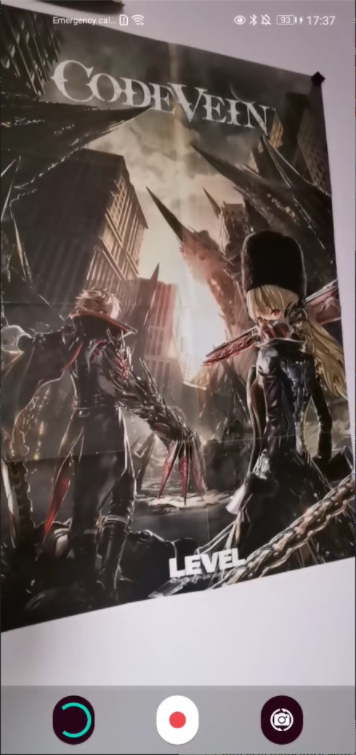
End result of our Record Activity