
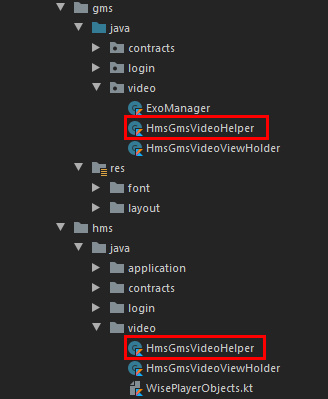
Note: Bear in mind that any class or layout file names we create under flavor dimensions that we’ll use under our main must match on both flavor dimensions! As an example “HmsGmsVideoHelper.kt” this class name must exist on both flavors if we are to use it on under our main
HMS Video Kit
Supported Formats
HUAWEI Video Kit provides video playback in this version and will support video editing and video hosting in later versions, helping you quickly build desired video features to deliver a superb video experience to your app users.
You can integrate the Video Kit WisePlayer SDK into your app so that it can play streaming media from a third-party video address. Streaming media must be in 3GP, MP4, or TS format and comply with HTTP/HTTPS, HLS, or DASH. Currently, it cannot play local video.
For example, you want to promote your tool app using a promotional video in it, and have hosted the video on a third-party cloud platform. In this case, you can directly call the playback API of the Video Kit WisePlayer SDK to play the video online.
Implementing HMS Video Kit
In this example will see 2 implementations. One with a big player, the other with a classical recycler view approach.
Refer to this guide first create an HMS application to create an agconnect-services.json file
Let us first start by creating our interfaces under hms flavor and we’ll continue building everything in this section under hms flavor. Keep in mind! :

Firstly we have to initialize WisePlay Services. We need to do that under hms flavor because bear in mind that we have separated its implementation under the notation of “hmsImplementation”. For to initialize it we have to create a new application class.
WisePlayer Init, This object is hms specific so we don’t have to create its mirror object on gms flavor.
object WisePlayerInit {

    lateinit var wisePlayerFactory: WisePlayerFactory

    fun initialize(context: Context) {
        // TODO Initializing of Wise Player Factory
        val factoryOptions = WisePlayerFactoryOptions.Builder().setDeviceId("xxx").build()
        // In the multi-process scenario, the onCreate method in Application is called multiple times.
        // The app needs to call the WisePlayerFactory.initFactory() API in the onCreate method of the app process (named "app package name")
        // and WisePlayer process (named "app package name:player").
        WisePlayerFactory.initFactory(context, factoryOptions, object : InitFactoryCallback {
            override fun onSuccess(factory: WisePlayerFactory) {
                showLogInfo("WisePlayerInit","WisePlayerInit Success")
                wisePlayerFactory = factory
            }

            override fun onFailure(errorCode: Int, msg: String) {
                showLogError("WisePlayerInit", "onFailure: $errorCode - $msg")
            }
        })
    }

    fun createPlayer(): WisePlayer? {
        //TODO Initializing of Wise Player Instance
        return if (::wisePlayerFactory.isInitialized) {
            wisePlayerFactory.createWisePlayer()
        } else {
            null
        }
    }
}
Application class, This application class is necessary for hms only, so we don’t have to create its mirror application class on gms flavor.
class ExoVideoApp : Application() {

    override fun onCreate() {
        super.onCreate()
        setApp(this)
        WisePlayerInit.initialize(this)
    }

    companion object {
        var instance: ExoVideoApp? = null
            private set

        val context: Context
            get() = instance!!.applicationContext

        @Synchronized
        private fun setApp(app: ExoVideoApp) {
            instance = app
        }
    }
}
Also, this manifest file is hms specific. Once we run our application it will merge itself with our original manifest file. Now, let’s call it in the manifest.
<manifest xmlns:android="http://schemas.android.com/apk/res/android"
    xmlns:tools="http://schemas.android.com/tools"
    package="com.onurcan.exovideoreference">
    <uses-permission android:name="com.huawei.permission.SECURITY_DIAGNOSE" />

    <application tools:ignore="AllowBackup"
        android:name="application.ExoVideoApp">

    </application>
Lets define our interfaces to use within the Video Kits lifecycle.
- OnInteract
interface OnInteract {
    fun bindVisibility()
    fun initUI(type: Int)
    fun configureContentV()
    fun configureControlV()
    fun restartPlayer(videoUrl: String)
    fun changePlayState()
    fun setPauseView()
    fun setPlayView()
    fun readyPlayer(videoUrl: String, string: String)
}- OnPlayWindowListener
interface OnPlayWindowListener :  SurfaceHolder.Callback, TextureView.SurfaceTextureListener {
}- OnWisePlayerListener
interface OnWisePlayerListener: SeekBar.OnSeekBarChangeListener,
    WisePlayer.ErrorListener, WisePlayer.EventListener, WisePlayer.ResolutionUpdatedListener,
    WisePlayer.LoadingListener, WisePlayer.SeekEndListener, WisePlayer.PlayEndListener,WisePlayer.ReadyListener
{
}
Now let look at the video layout
<androidx.constraintlayout.widget.ConstraintLayout xmlns:android="http://schemas.android.com/apk/res/android"
    xmlns:app="http://schemas.android.com/apk/res-auto"
    xmlns:tools="http://schemas.android.com/tools"
    android:layout_width="match_parent"
    android:layout_height="match_parent"
    android:background="@color/black">

    <FrameLayout
        android:id="@+id/frameLayout"
        android:layout_width="match_parent"
        android:layout_height="match_parent"
        android:animateLayoutChanges="true"
        app:layout_constraintDimensionRatio="16:9"
        app:layout_constraintEnd_toEndOf="parent"
        app:layout_constraintStart_toStartOf="parent"
        app:layout_constraintTop_toTopOf="parent"
        app:layout_constraintWidth_percent="0.9">

        <ImageButton
            android:id="@+id/info_panel_btn"
            android:layout_width="wrap_content"
            android:layout_height="wrap_content"
            android:layout_gravity="end"
            android:layout_marginStart="10dp"
            android:layout_marginTop="40dp"
            android:layout_marginEnd="10dp"
            android:background="@color/transparent"
            android:clickable="true"
            android:contentDescription="@string/info"
            android:elevation="4dp"
            android:focusable="true"
            android:foreground="@drawable/round_selector"
            android:src="@drawable/ic_info_circle" />

        <SurfaceView
            android:id="@+id/surfaceView"
            android:layout_width="match_parent"
            android:layout_height="match_parent" />

        <com.airbnb.lottie.LottieAnimationView
            android:id="@+id/lottieView"
            android:layout_width="match_parent"
            android:layout_height="match_parent"
            android:elevation="2dp"
            app:lottie_autoPlay="true"
            app:lottie_loop="true"
            app:lottie_rawRes="@raw/lottie_loading2" />
    </FrameLayout>

    <!-- UI Controller -->

    <LinearLayout
        android:layout_width="match_parent"
        android:layout_height="wrap_content"
        android:animateLayoutChanges="true"
        android:background="@drawable/content_control_background"
        android:elevation="3dp"
        android:orientation="vertical"
        app:layout_constraintBottom_toBottomOf="parent"
        app:layout_constraintEnd_toEndOf="parent"
        app:layout_constraintStart_toStartOf="parent">

        <ImageButton
            android:id="@+id/extend_control"
            android:layout_width="match_parent"
            android:layout_height="wrap_content"
            android:layout_gravity="center_horizontal"
            android:background="@color/transparent"
            android:clickable="true"
            android:contentDescription="@string/arrow"
            android:focusable="true"
            android:foreground="@drawable/round_ripple"
            android:src="@drawable/ic_arrow_drop_down"
            android:tint="@color/white" />

        <LinearLayout
            android:id="@+id/content_social"
            android:layout_width="match_parent"
            android:layout_height="wrap_content"
            android:orientation="horizontal"
            android:padding="5dp"
            android:weightSum="3">

            <TextView
                android:id="@+id/lovely"
                android:layout_width="0dp"
                android:layout_height="wrap_content"
                android:layout_weight="1"
                android:background="@color/transparent"
                android:clickable="true"
                android:focusable="true"
                android:fontFamily="@font/bitter_italic"
                android:foreground="@drawable/round_selector"
                android:gravity="center_horizontal"
                android:text="@string/lovely"
                android:textColor="@color/textColor_night"
                app:drawableTopCompat="@drawable/ic_heart" />

            <TextView
                android:id="@+id/comment"
                android:layout_width="0dp"
                android:layout_height="wrap_content"
                android:layout_weight="1"
                android:background="@color/transparent"
                android:clickable="true"
                android:focusable="true"
                android:fontFamily="@font/bitter_italic"
                android:foreground="@drawable/round_selector"
                android:gravity="center_horizontal"
                android:text="@string/comment"
                android:textColor="@color/textColor_night"
                app:drawableTopCompat="@drawable/ic_message" />

            <TextView
                android:id="@+id/share"
                android:layout_width="0dp"
                android:layout_height="wrap_content"
                android:layout_weight="1"
                android:background="@color/transparent"
                android:clickable="true"
                android:focusable="true"
                android:fontFamily="@font/bitter_italic"
                android:foreground="@drawable/round_selector"
                android:gravity="center_horizontal"
                android:text="@string/share"
                android:textColor="@color/textColor_night"
                app:drawableTopCompat="@drawable/ic_share" />

        </LinearLayout>

        <LinearLayout
            android:id="@+id/content_info"
            android:layout_width="match_parent"
            android:layout_height="wrap_content"
            android:orientation="horizontal"
            android:visibility="visible"
            android:weightSum="1"
            tools:visibility="visible">

            <de.hdodenhof.circleimageview.CircleImageView
                android:layout_width="0dp"
                android:layout_height="48dp"
                android:layout_weight=".2"
                android:src="@drawable/video_stock" />

            <TextView
                android:id="@+id/video_name"
                style="@style/TextAppearance.AppCompat.Small"
                android:layout_width="0dp"
                android:layout_height="wrap_content"
                android:layout_gravity="bottom"
                android:layout_weight=".8"
                android:ellipsize="end"
                android:fontFamily="@font/bitter_italic"
                android:maxEms="3"
                android:maxLines="3"
                android:textColor="@color/white"
                android:textSize="12sp"
                tools:text="Video Name" />

        </LinearLayout>

        <LinearLayout
            android:id="@+id/content_control"
            android:layout_width="match_parent"
            android:layout_height="wrap_content"
            android:layout_marginTop="10dp"
            android:orientation="horizontal"
            android:visibility="visible"
            android:weightSum="3"
            tools:visibility="visible">

            <ImageButton
                android:id="@+id/r10s"
                android:layout_width="0dp"
                android:layout_height="wrap_content"
                android:layout_weight="1"
                android:background="@color/transparent"
                android:clickable="true"
                android:contentDescription="@string/replay_10s"
                android:focusable="true"
                android:foreground="@drawable/round_selector"
                android:src="@drawable/ic_replay_10"
                android:tint="@color/white" />

            <ImageButton
                android:id="@+id/play_btn"
                android:layout_width="0dp"
                android:layout_height="wrap_content"
                android:layout_weight="1"
                android:background="@color/transparent"
                android:clickable="true"
                android:contentDescription="@string/play_video"
                android:focusable="true"
                android:foreground="@drawable/round_selector"
                android:src="@drawable/ic_play"
                android:tint="@color/white" />

            <ImageButton
                android:id="@+id/f10s"
                android:layout_width="0dp"
                android:layout_height="wrap_content"
                android:layout_weight="1"
                android:background="@color/transparent"
                android:clickable="true"
                android:contentDescription="@string/forward_10s"
                android:focusable="true"
                android:foreground="@drawable/round_selector"
                android:src="@drawable/ic_forward_10"
                android:tint="@color/white" />

        </LinearLayout>

        <SeekBar
            android:id="@+id/seekBar"
            style="@style/mSeekBar"
            android:layout_width="match_parent"
            android:layout_height="wrap_content"
            android:layout_marginStart="8dp"
            android:layout_marginEnd="8dp"
            android:max="100"
            android:progress="0"
            android:visibility="visible"
            tools:visibility="visible" />

    </LinearLayout>

</androidx.constraintlayout.widget.ConstraintLayout>
Big Player — Fullscreen Approach
Let’s start by initing properties
class HmsGmsVideoHelper(context: SinglePlayerActivity) : OnPlayWindowListener,
    OnWisePlayerListener {

    val cntxt = context
    val binding: ActivitySinglePlayerBinding

    private var isPlaying = false
    private val mStopHandler = false

    private val player: WisePlayer? by lazy {
        showLogInfo(Constants.mHmsGmsVideoHelper, "Player WisePlayerInit")
        WisePlayerInit.createPlayer()
    }

    private val mHandler: Handler by lazy { Handler() }

    private val runnable: Runnable by lazy {
        Runnable {
            configureContentV()
            configureControlV()
            if (!mStopHandler) {
                mHandler.postDelayed(runnable, Constants.DELAY_SECOND)
            }
        }
    }
…
}- init
init {
    binding = ActivitySinglePlayerBinding.inflate(cntxt.layoutInflater)
    val view = binding.root
    cntxt.setContentView(view)
    initUI()
}- initUI()
private fun initUI() {
    showLogInfo(Constants.mHmsGmsVideoHelper, "Player initUI")
    binding.layoutVideoIncluder.surfaceView.holder.addCallback(this)
    binding.layoutVideoIncluder.surfaceView.holder.setType(SurfaceHolder.SURFACE_TYPE_PUSH_BUFFERS)
    cntxt.findViewById<LinearLayout>(R.id.content_social).visibility = View.GONE

    player?.setReadyListener(this)
    player?.setErrorListener(this)
    player?.setEventListener(this)
    player?.setResolutionUpdatedListener(this)
    player?.setLoadingListener(this)
    player?.setPlayEndListener(this)
    player?.setSeekEndListener(this)

    binding.layoutVideoIncluder.f10s.setOnClickListener {
        player?.seek(player?.currentTime!!+10000)
    }

    binding.layoutVideoIncluder.r10s.setOnClickListener {
        player?.seek(player?.currentTime!!-10000)
    }

    player?.cycleMode = PlayerConstants.CycleMode.MODE_NORMAL

    binding.layoutVideoIncluder.extendControl.setOnClickListener {
        binding.layoutVideoIncluder.contentInfo.expandView()
        binding.layoutVideoIncluder.contentControl.expandView()
        binding.layoutVideoIncluder.seekBar.expandView()

        if (binding.layoutVideoIncluder.seekBar.visibility == View.GONE)
            binding.layoutVideoIncluder.extendControl.setImageResource(R.drawable.ic_arrow_drop_up)
        else
            binding.layoutVideoIncluder.extendControl.setImageResource(R.drawable.ic_arrow_drop_down)
    }

    binding.layoutVideoIncluder.playBtn.setOnClickListener {
        changePlayState()
    }
}- configureContentV()
private fun configureContentV() {
    showLogInfo(
        Constants.mHmsGmsVideoHelper,
        "Player width: ${player?.videoWidth} - Height: ${player?.videoHeight}"
    )
    showLogInfo(Constants.mHmsGmsVideoHelper, "Player is playing: ${player?.isPlaying}")
    showLogInfo(Constants.mHmsGmsVideoHelper, "Player play mode: ${player?.playMode}")
    showLogInfo(
        Constants.mHmsGmsVideoHelper, "Player bitrate: ${
            player?.currentStreamInfo?.bitrate?.toString()
        }"
    )
}- configureControlV()
private fun configureContentV() {
    showLogInfo(
private fun configureControlV() {
    binding.layoutVideoIncluder.seekBar.max = player?.duration!!
    binding.layoutVideoIncluder.seekBar.progress = player?.currentTime!!
    binding.layoutVideoIncluder.seekBar.secondaryProgress = player?.bufferTime!!
}- changePlayState()
private fun changePlayState() {
    if (isPlaying) {
        player?.pause()
        isPlaying = false
        setPlayView()
    } else {
        player?.start()
        isPlaying = true
        setPauseView()
    }
}- releasePlayer()
fun releasePlayer() {
    showLogInfo(Constants.mHmsGmsVideoHelper, "Player releasePlayer")
    player?.setErrorListener(null)
    player?.setEventListener(null)
    player?.setResolutionUpdatedListener(null)
    player?.setReadyListener(null)
    player?.setLoadingListener(null)
    player?.setPlayEndListener(null)
    player?.setSeekEndListener(null)
    player?.release()
}- setPlayView()
private fun setPlayView() {
    binding.layoutVideoIncluder.playBtn.setImageResource(R.drawable.ic_play)
    binding.layoutVideoIncluder.lottieView.visibility=View.VISIBLE
}- setPauseView()
private fun setPauseView() {
    binding.layoutVideoIncluder.playBtn.setImageResource(R.drawable.ic_pause)
    binding.layoutVideoIncluder.lottieView.visibility=View.GONE
}- readyPlayer(…)
fun readyPlayer(videoUrl: String, string: String) {
    player?.setPlayUrl(videoUrl)
    player?.ready()
    binding.layoutVideoIncluder.videoName.text = string
}- surfaceCreated(…)
override fun surfaceCreated(holder: SurfaceHolder?) {
    player?.setView(binding.layoutVideoIncluder.surfaceView)
    player?.resume(PlayerConstants.ResumeType.KEEP)
}- surfaceChanged(…)
override fun surfaceChanged(holder: SurfaceHolder?, format: Int, width: Int, height: Int) {
    player?.setSurfaceChange()
}- surfaceDestroyed(…)
override fun surfaceDestroyed(holder: SurfaceHolder?) {
    player?.suspend()
}- onSurfaceTextureAvailable(…)
override fun onSurfaceTextureAvailable(surface: SurfaceTexture?, width: Int, height: Int) {
    player?.resume(PlayerConstants.ResumeType.KEEP)
}- onReady(…)
override fun onReady(p0: WisePlayer?) {
    showLogInfo(Constants.mHmsGmsVideoHelper, "On Ready")
    player?.start()
    isPlaying = true
    cntxt.runOnUiThread {
        configureControlV()
        mHandler.postDelayed(runnable, Constants.DELAY_SECOND)
    }
}- onPlayEnd(…)
override fun onPlayEnd(p0: WisePlayer?) {
    showLogInfo(Constants.mHmsGmsVideoHelper, "onPlayEnd")
    isPlaying = false
    setPlayView()
}- fonStartTrackingTouch(…)
override fun onStartTrackingTouch(seekBar: SeekBar?) {
    seekBar?.progress?.let { player?.seek(it) }
}- onStartTrackingTouch(…)
override fun onStopTrackingTouch(seekBar: SeekBar?) {
    seekBar?.progress?.let { player?.seek(it) }
}