
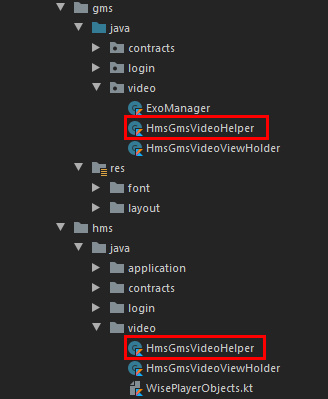
Note: Bear in mind that any class or layout file names we create under flavor dimensions that we’ll use under our main must match on both flavor dimensions! As an example “HmsGmsVideoHelper.kt” this class name must exist on both flavors if we are to use it on under our main
Exo Player

ExoPlayer is an application-level media player for Android. It provides an alternative to Android’s MediaPlayer API for playing audio and video both locally and over the Internet. ExoPlayer supports features not currently supported by Android’s MediaPlayer API, including DASH and SmoothStreaming adaptive playbacks. Unlike the MediaPlayer API, ExoPlayer is easy to customize and extend and can be updated through Play Store application updates.
Supported Formats
When defining the formats that ExoPlayer supports, it’s important to note that “media formats” are defined at multiple levels. From the lowest level to the highest, these are:
- The format of the individual media samples (e.g., a frame of video or a frame of audio). These are sample formats. Note that a typical video file will contain media in at least two sample formats; one for video (e.g., H.264) and one for audio (e.g., AAC).
- The format of the container that houses the media samples and associated metadata. These are container formats. A media file has a single container format (e.g., MP4), which is commonly indicated by the file extension. Note that for some audio-only formats (e.g., MP3), the sample and container formats may be the same.
- Adaptive streaming technologies such as DASH, SmoothStreaming, and HLS. These are not media formats as such, however, it’s still necessary to define what level of support ExoPlayer provides
Implementing Exo Player
In this example will see 2 implementations. One with a big player, the other with a classical recycler view approach.
Let us first start by creating our interfaces under gms flavor and we’ll continue building everything in this section under gms flavor. Keep in mind! :
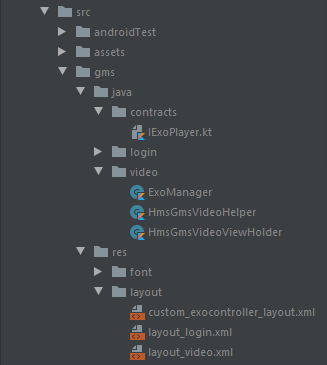
Let’s start by creating custom layout controllers for this Exo Player.
<LinearLayout xmlns:android="http://schemas.android.com/apk/res/android"
    xmlns:app="http://schemas.android.com/apk/res-auto"
    xmlns:tools="http://schemas.android.com/tools"
    android:layout_width="match_parent"
    android:layout_height="wrap_content"
    android:layout_gravity="bottom"
    android:background="@drawable/content_control_background"
    android:layoutDirection="ltr"
    android:orientation="vertical"
    tools:targetApi="28">

    <LinearLayout
        android:id="@+id/content_social"
        android:layout_width="match_parent"
        android:layout_height="wrap_content"
        android:orientation="horizontal"
        android:padding="5dp"
        android:weightSum="3">

        <androidx.appcompat.widget.AppCompatTextView
            android:id="@+id/lovely"
            android:layout_width="0dp"
            android:layout_height="wrap_content"
            android:layout_weight="1"
            android:background="@color/transparent"
            android:clickable="true"
            android:focusable="true"
            android:fontFamily="@font/bitter_italic"
            android:foreground="@drawable/round_selector"
            android:gravity="center_horizontal"
            android:text="@string/lovely"
            android:textColor="@color/textColor_night"
            app:drawableTopCompat="@drawable/ic_heart" />

        <androidx.appcompat.widget.AppCompatTextView
            android:id="@+id/comment"
            android:layout_width="0dp"
            android:layout_height="wrap_content"
            android:layout_weight="1"
            android:background="@color/transparent"
            android:clickable="true"
            android:focusable="true"
            android:fontFamily="@font/bitter_italic"
            android:foreground="@drawable/round_selector"
            android:gravity="center_horizontal"
            android:text="@string/comment"
            android:textColor="@color/textColor_night"
            app:drawableTopCompat="@drawable/ic_message" />

        <androidx.appcompat.widget.AppCompatTextView
            android:id="@+id/share"
            android:layout_width="0dp"
            android:layout_height="wrap_content"
            android:layout_weight="1"
            android:background="@color/transparent"
            android:clickable="true"
            android:focusable="true"
            android:fontFamily="@font/bitter_italic"
            android:foreground="@drawable/round_selector"
            android:gravity="center_horizontal"
            android:text="@string/share"
            android:textColor="@color/textColor_night"
            app:drawableTopCompat="@drawable/ic_share" />

    </LinearLayout>

    <LinearLayout
        android:id="@+id/content_info"
        android:layout_width="match_parent"
        android:layout_height="wrap_content"
        android:layout_marginTop="5dp"
        android:orientation="horizontal"
        android:weightSum="1">

        <de.hdodenhof.circleimageview.CircleImageView
            android:layout_width="0dp"
            android:layout_height="48dp"
            android:layout_weight=".2"
            android:src="@drawable/video_stock" />

        <TextView
            android:id="@+id/video_name"
            style="@style/TextAppearance.AppCompat.Small"
            android:layout_width="0dp"
            android:layout_height="wrap_content"
            android:layout_gravity="bottom"
            android:layout_weight=".8"
            android:fontFamily="@font/bitter_italic"
            android:ellipsize="end"
            android:maxEms="3"
            android:maxLines="3"
            android:textColor="@color/white"
            android:textSize="12sp"
            tools:text="Video Name" />

    </LinearLayout>

    <LinearLayout
        android:layout_width="match_parent"
        android:layout_height="wrap_content"
        android:gravity="center"
        android:orientation="horizontal"
        android:paddingTop="4dp">

        <ImageButton
            android:id="@id/exo_prev"
            style="@style/ExoMediaButton.Previous"
            android:contentDescription="@string/preview"
            android:tint="@color/white" />


        <ImageButton
            android:id="@id/exo_shuffle"
            style="@style/ExoMediaButton"
            android:contentDescription="@string/shuffle"
            android:tint="@color/white" />

        <ImageButton
            android:id="@id/exo_repeat_toggle"
            style="@style/ExoMediaButton"
            android:contentDescription="@string/repeat"
            android:tint="@color/white" />

        <ImageButton
            android:id="@id/exo_play"
            style="@style/ExoMediaButton.Play"
            android:contentDescription="@string/play"
            android:tint="@color/white" />

        <ImageButton
            android:id="@id/exo_pause"
            style="@style/ExoMediaButton.Pause"
            android:contentDescription="@string/pause"
            android:tint="@color/white" />

        <ImageButton
            android:id="@id/exo_next"
            style="@style/ExoMediaButton.Next"
            android:contentDescription="@string/next"
            android:tint="@color/white" />

        <ImageButton
            android:id="@id/exo_vr"
            style="@style/ExoMediaButton.VR"
            android:contentDescription="@string/vr"
            android:tint="@color/white" />

    </LinearLayout>

    <LinearLayout
        android:layout_width="match_parent"
        android:layout_height="wrap_content"
        android:layout_marginTop="4dp"
        android:gravity="center_vertical"
        android:orientation="horizontal">

        <TextView
            android:id="@id/exo_position"
            android:layout_width="wrap_content"
            android:layout_height="wrap_content"
            android:includeFontPadding="false"
            android:paddingLeft="4dp"
            android:paddingRight="4dp"
            android:textColor="#FFBEBEBE"
            android:textSize="14sp"
            android:textStyle="bold" />

        <View
            android:id="@id/exo_progress_placeholder"
            android:layout_width="0dp"
            android:layout_height="26dp"
            android:layout_weight="1" />

        <TextView
            android:id="@id/exo_duration"
            android:layout_width="wrap_content"
            android:layout_height="wrap_content"
            android:includeFontPadding="false"
            android:paddingLeft="4dp"
            android:paddingRight="4dp"
            android:textColor="#FFBEBEBE"
            android:textSize="14sp"
            android:textStyle="bold" />

    </LinearLayout>

</LinearLayout>
Now let’s create our video layout:
<androidx.constraintlayout.widget.ConstraintLayout xmlns:android="http://schemas.android.com/apk/res/android"
    xmlns:app="http://schemas.android.com/apk/res-auto"
    android:layout_width="match_parent"
    android:layout_height="match_parent"
    android:animateLayoutChanges="true"
    android:elevation="-1dp"
    android:background="@color/black">

    <com.airbnb.lottie.LottieAnimationView
        android:id="@+id/lottieView"
        android:layout_width="match_parent"
        android:layout_height="match_parent"
        android:elevation="2dp"
        app:lottie_autoPlay="true"
        app:lottie_loop="true"
        app:lottie_rawRes="@raw/lottie_loading2" />

    <ImageButton
        android:id="@+id/info_panel_btn"
        android:layout_width="wrap_content"
        android:layout_height="wrap_content"
        android:layout_gravity="end"
        android:background="@color/transparent"
        android:clickable="true"
        android:contentDescription="@string/info"
        android:elevation="4dp"
        android:focusable="true"
        android:foreground="@drawable/round_selector"
        android:src="@drawable/ic_info_circle"
        app:layout_constraintBottom_toBottomOf="parent"
        app:layout_constraintEnd_toEndOf="parent"
        app:layout_constraintHorizontal_bias="0.9"
        app:layout_constraintStart_toStartOf="parent"
        app:layout_constraintTop_toTopOf="parent"
        app:layout_constraintVertical_bias="0.05" />

    <FrameLayout
        android:layout_width="match_parent"
        android:layout_height="match_parent"
        app:layout_constraintDimensionRatio="16:9">

        <com.google.android.exoplayer2.ui.PlayerView
            android:id="@+id/playerView"
            android:layout_width="match_parent"
            android:layout_height="match_parent"
            app:controller_layout_id="@layout/custom_exocontroller_layout"
            app:repeat_toggle_modes="one"
            app:surface_type="surface_view" />
    </FrameLayout>


</androidx.constraintlayout.widget.ConstraintLayout>
Now we can begin to create our interface
interface IExoPlayer {
    fun readyPlayer(videoUrl: String?, name: String)
    fun releasePlayer()
}

interface OnInteract{
    fun shareUri(uri: String)
    fun initDialog()
    fun bindDialogInfo(vUrl:String, vSender:String, vSenderID:String, vLovely:String)
    fun bindInformativeDialog()
    fun readyPlayer(videoUrl: String, name: String)
    fun releasePlayer()
    fun initUI(type: Int)
}

interface ICallBacks {
    fun callbackObserver(obj: Any?)
    interface playerCallBack {
        fun onItemClickOnItem(albumId: Int?)
        fun onPlayingEnd()
    }
}
Big Player — Fullscreen Approach
The big player will be under our HmsGmsHelper class extending our interface and binding itself to our SinglePlayerActivity.kt:
class HmsGmsVideoHelper(context: SinglePlayerActivity):IExoPlayer {

    private val cntx = context
    private var binding: ActivitySinglePlayerBinding

    private var playerView: PlayerView

    private val videoName: TextView
    private val linSocial: LinearLayout

    private val lottieAnimationView: LottieAnimationView

    private lateinit var player: SimpleExoPlayer
    private var playWhenReady = true
    private var currentWindow = 0
    private var playbackPosition: Long = 0
    var dataSourceFactory: DefaultDataSourceFactory

    init {
        binding = ActivitySinglePlayerBinding.inflate(cntx.layoutInflater)
        val view = binding.root
        cntx.setContentView(view)
        lottieAnimationView = cntx.findViewById(R.id.lottieView)
        lottieAnimationView.visibility = View.VISIBLE
        videoName = cntx.findViewById(R.id.video_name)
        linSocial = cntx.findViewById(R.id.content_social)
        playerView = binding.layoutVideoIncluder.playerView
        dataSourceFactory = DefaultDataSourceFactory(
            cntx,
            Util.getUserAgent(cntx, "ExoVideo"),
            ExoManager.BANDWIDTH_METER
        )
        linSocial.visibility=View.GONE
    }

    private fun buildMediaSource(uri: Uri): MediaSource {
        val dataSourceFactory: DataSource.Factory = DefaultDataSourceFactory(cntx, "exop")
        return ProgressiveMediaSource.Factory(dataSourceFactory).createMediaSource(uri)
    }

    override fun readyPlayer(videoUrl: String?, name: String) {
        player = SimpleExoPlayer.Builder(cntx).build()
        playerView.player = player
        val mediaItem = MediaItem.fromUri(Uri.parse(videoUrl))
        val mediaSource = buildMediaSource(Uri.parse(videoUrl))
        player.setMediaItem(mediaItem)

        videoName.text = name

        playerView.resizeMode = AspectRatioFrameLayout.RESIZE_MODE_FIT

        player.playWhenReady = playWhenReady
        lottieAnimationView.visibility = View.GONE
        player.seekTo(currentWindow, playbackPosition)
        player.prepare(mediaSource,false,false)

        showLogInfo(Constants.mHmsGmsVideoHelper,videoUrl!!)
    }

    override fun releasePlayer() {
        playWhenReady = player.playWhenReady
        playbackPosition = player.currentPosition
        currentWindow = player.currentWindowIndex
        player.release()
    }
}
Recycler View Approach
In this part, we will bind our videos that have shareable options in them to a recycler view. We want one video at a time on a single up-down scroll.
We can start on our Recycler View Holder by creating our properties:
class HmsGmsVideoViewHolder(itemView: View) : RecyclerView.ViewHolder(itemView), OnInteract {

    val parent = itemView

    var playerView: PlayerView
    private val contentInfoLayout: LinearLayout
    private val videoName: TextView

    val sLovely: TextView
    val sMessage: TextView
    val sShare: TextView

    private var dialog = Dialog(parent.context, R.style.BlurTheme)

    private lateinit var vServiceProvider: TextView
    private lateinit var vVideoUrl: TextView
    private lateinit var vVideoSender: TextView
    private lateinit var vVideoSenderID: TextView
    private lateinit var vWidthHeight: TextView
    private lateinit var vPlayMode: TextView
    private lateinit var vBitrate: TextView
    private lateinit var vVideoLovely: TextView
    private lateinit var vVideoComments: TextView

    private val lottieAnimationView: LottieAnimationView

    private var infoPanelBtn: ImageButton

    private lateinit var player: SimpleExoPlayer
    private var playWhenReady = true
    private var currentWindow = 0
    private var playbackPosition: Long = 0
…
}
Then we can fill our overridden functions and create some of our own:
- shareUri(…)
override fun shareUri(uri: String) {
    val sharingIntent = Intent(Intent.ACTION_SEND)
    sharingIntent.type = "text/html"
    sharingIntent.putExtra(Intent.EXTRA_SUBJECT, "Share Video - Entertainment")
    sharingIntent.putExtra(Intent.EXTRA_TEXT, uri)
    parent.context.startActivity(Intent.createChooser(sharingIntent, "Share Video"))
}- initDialog(), This dialog will help users to see detailed information about the video they’re currently watching.
override fun initDialog() {
    val width = ViewGroup.LayoutParams.WRAP_CONTENT
    val height = ViewGroup.LayoutParams.WRAP_CONTENT
    dialog.window!!.setLayout(width, height)
    dialog.window!!.attributes.windowAnimations = R.style.DialogSlide
    dialog.setContentView(R.layout.dialog_video_info)
    dialog.setCanceledOnTouchOutside(true)

    vServiceProvider = dialog.findViewById(R.id.d_video_service_provider)
    vVideoUrl = dialog.findViewById(R.id.d_video_url)
    vVideoSender = dialog.findViewById(R.id.d_video_sender)
    vVideoSenderID = dialog.findViewById(R.id.d_video_sender_id)
    vWidthHeight = dialog.findViewById(R.id.d_video_width_height)
    vPlayMode = dialog.findViewById(R.id.d_video_play_mode)
    vBitrate = dialog.findViewById(R.id.d_video_bitrate)
    vVideoLovely = dialog.findViewById(R.id.d_video_given_lovelies)
    vVideoComments = dialog.findViewById(R.id.d_video_total_comments)

}
override fun initDialog() {
val width = ViewGroup.LayoutParams.WRAP_CONTENT
val height = ViewGroup.LayoutParams.WRAP_CONTENT
dialog.window!!.setLayout(width, height)
dialog.window!!.attributes.windowAnimations = R.style.DialogSlide
dialog.setContentView(R.layout.dialog_video_info)
dialog.setCanceledOnTouchOutside(true)
vServiceProvider = dialog.findViewById(R.id.d_video_service_provider)
vVideoUrl = dialog.findViewById(R.id.d_video_url)
vVideoSender = dialog.findViewById(R.id.d_video_sender)
vVideoSenderID = dialog.findViewById(R.id.d_video_sender_id)
vWidthHeight = dialog.findViewById(R.id.d_video_width_height)
vPlayMode = dialog.findViewById(R.id.d_video_play_mode)
vBitrate = dialog.findViewById(R.id.d_video_bitrate)
vVideoLovely = dialog.findViewById(R.id.d_video_given_lovelies)
vVideoComments = dialog.findViewById(R.id.d_video_total_comments)
}- bindDialogInfo(…)
verride fun bindDialogInfo(vUrl: String, vSender: String, vSenderID: String, vLovely: String) {
    vVideoUrl.text = vUrl
    vVideoSender.text = vSender
    vVideoSenderID.text = vSenderID
    vVideoLovely.text = NumberConvertor.prettyCount(vLovely.toLong())
}- bindInformativeDialog()
override fun bindInformativeDialog() {

    val vExit = dialog.findViewById<TextView>(R.id.d_exit)

    vServiceProvider.text = parent.context.getString(R.string.gms_video)
    vWidthHeight.text = parent.context.getString(
        R.string.video_width_height_params,
        playerView.width.toString(), playerView.width.toString()
    )
    vPlayMode.text = playerView.player.toString()
    vBitrate.text = "${player.audioStreamType}"

    vExit.setOnClickListener { dialog.dismiss() }
    dialog.show()
}- initUI(…)
override fun initUI(type: Int) {
    infoPanelBtn.setOnClickListener {
        bindInformativeDialog()
    }
}- bindComments(…)
fun bindComments(vComments:String){
    vVideoComments.text = NumberConvertor.prettyCount(vComments.toLong())
}- buildMediaSource(…): MediaSource
private fun buildMediaSource(uri: Uri): MediaSource {
    val dataSourceFactory: DataSource.Factory = DefaultDataSourceFactory(parent.context, "exop")
    return ProgressiveMediaSource.Factory(dataSourceFactory).createMediaSource(uri)
}- readyPlayer(…)
override fun readyPlayer(videoUrl: String, name: String) {
    player = SimpleExoPlayer.Builder(parent.context).build()
    playerView.player = player
    val mediaItem = MediaItem.fromUri(Uri.parse(videoUrl))
    player.setMediaItem(mediaItem)

    videoName.text = name

    playerView.resizeMode = AspectRatioFrameLayout.RESIZE_MODE_FIT

    player.playWhenReady = playWhenReady
    lottieAnimationView.visibility = View.GONE
    player.seekTo(currentWindow, playbackPosition)
    player.prepare()
}- releasePlayer()
override fun releasePlayer() {
    playWhenReady = player.playWhenReady
    playbackPosition = player.currentPosition
    currentWindow = player.currentWindowIndex
    player.release()
}