CameraX
CameraX is a Jetpack support library, built to help you make camera app development easier. It provides a consistent and easy-to-use API surface that works across most Android devices, with backward compatibility to Android 5.0
While it leverages the capabilities of camera2, it uses a simpler, uses a case-based approach that is lifecycle-aware. It also resolves device compatibility issues for you so that you don’t have to include device-specific code in your codebase. These features reduce the amount of code you need to write when adding camera capabilities to your app.
Use Cases
CameraX introduces use cases, which allow you to focus on the task you need to get done instead of spending time managing device-specific nuances. There are several basic use cases:
- Preview: get an image on the display
- Image analysis: access a buffer seamlessly for use in your algorithms, such as to pass into MLKit
- Image capture: save high-quality images
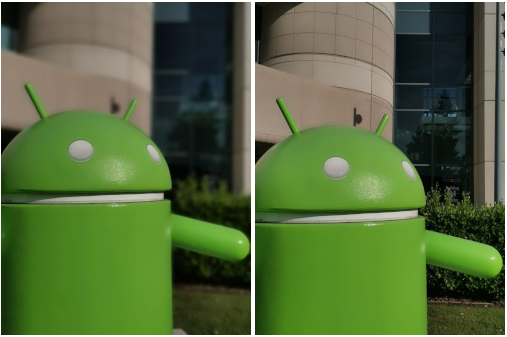
CameraX has an optional add-on, called Extensions, which allow you to access the same features and capabilities as those in the native camera app that ships with the device, with just two lines of code.
The first set of capabilities available include Portrait, HDR, Night, and Beauty. These capabilities are available on supported devices.
Implementing Preview
When adding a preview to your app, use PreviewView, which is a View that can be cropped, scaled, and rotated for proper display.
The image preview streams to a surface inside the PreviewView when the camera becomes active.
Implementing a preview for CameraX using PreviewView involves the following steps, which are covered in later sections:
- Optionally configure a CameraXConfig.Provider.
- Add a PreviewView to your layout.
- Request a CameraProvider.
- On View creation, check for the CameraProvider.
- Select a camera and bind the lifecycle and use cases.
Using PreviewView has some limitations. When using PreviewView, you can’t do any of the following things:
- Create a SurfaceTexture to set on TextureView and PreviewSurfaceProvider.
- Retrieve the SurfaceTexture from TextureView and set it on PreviewSurfaceProvider.
- Get the Surface from SurfaceView and set it on PreviewSurfaceProvider.
If any of these happen, then the Preview will stop streaming frames to the PreviewView.
On your app level build.gradle file add the following:
// CameraX core library using the camera2 implementation
 def camerax_version = "1.0.0-beta03"
 def camerax_extensions = "1.0.0-alpha10"
 implementation "androidx.camera:camera-core:${camerax_version}"
 implementation "androidx.camera:camera-camera2:${camerax_version}"
 // If you want to additionally use the CameraX Lifecycle library
 implementation "androidx.camera:camera-lifecycle:${camerax_version}"
 // If you want to additionally use the CameraX View class
 implementation "androidx.camera:camera-view:${camerax_extensions}"
 // If you want to additionally use the CameraX Extensions library
 implementation "androidx.camera:camera-extensions:${camerax_extensions}"
On your .xml file using the PreviewView is highly recommended:
<androidx.camera.view.PreviewView
 android:id="@+id/camera"
 android:layout_width="math_parent"
 android:layout_height="math_parent"
 android:contentDescription="@string/preview_area"
 android:importantForAccessibility="no"/>
Let’s start the backend coding for our previewView in our Activity or a Fragment:
private val REQUIRED_PERMISSIONS = arrayOf(Manifest.permission.CAMERA)
private lateinit var cameraSelector: CameraSelector
private lateinit var previewView: PreviewView
private lateinit var cameraProviderFeature: ListenableFuture<ProcessCameraProvider>
private lateinit var cameraControl: CameraControl
private lateinit var cameraInfo: CameraInfo
private lateinit var imageCapture: ImageCapture
private lateinit var imageAnalysis: ImageAnalysis
private lateinit var torchView: ImageView
private val executor = Executors.newSingleThreadExecutor()
takePicture() method:
fun takePicture() {
val file = createFile(
outputDirectory,
FILENAME,
PHOTO_EXTENSION
)
val outputFileOptions = ImageCapture.OutputFileOptions.Builder(file).build()
imageCapture.takePicture(
outputFileOptions,
executor,
object : ImageCapture.OnImageSavedCallback {
override fun onImageSaved(outputFileResults: ImageCapture.OutputFileResults) {
val msg = "Photo capture succeeded: ${file.absolutePath}"
previewView.post {
Toast.makeText(
context.applicationContext,
msg,
Toast.LENGTH_SHORT
).show()
//You can create a task to save your  image to any database you like
getImageTask(file)
}
}


override fun onError(exception: ImageCaptureException) {
val msg = "Photo capture failed: ${exception.message}"
showLogError(mTAG, msg)
}
})
}
As I said you may get uri from file and use it on anywhere you like:
fun getImageTask(file: File) {
val uri = Uri.fromFile(file)
}
This part is an example for starting front camera with minor changes I am sure you may switch between front and back:
fun startCameraFront() {
showLogDebug(mTAG, "startCameraFront")
CameraX.unbindAll()
torchView.visibility = View.INVISIBLE
imagePreviewView = Preview.Builder().apply {
setTargetAspectRatio(AspectRatio.RATIO_4_3)
setTargetRotation(previewView.display.rotation)
setDefaultResolution(Size(1920, 1080))
setMaxResolution(Size(3024, 4032))
}.build()
imageAnalysis = ImageAnalysis.Builder().apply {
setImageQueueDepth(ImageAnalysis.STRATEGY_KEEP_ONLY_LATEST)
}.build()
imageAnalysis.setAnalyzer(executor, LuminosityAnalyzer())
imageCapture = ImageCapture.Builder().apply {
setCaptureMode(ImageCapture.CAPTURE_MODE_MAXIMIZE_QUALITY)
}.build()
cameraSelector =
CameraSelector.Builder().requireLensFacing(CameraSelector.LENS_FACING_FRONT).build()
cameraProviderFeature.addListener(Runnable {
val cameraProvider = cameraProviderFeature.get()
val camera = cameraProvider.bindToLifecycle(
this,
cameraSelector,
imagePreviewView,
imageAnalysis,
imageCapture
)
previewView.preferredImplementationMode =
PreviewView.ImplementationMode.TEXTURE_VIEW
imagePreviewView.setSurfaceProvider(previewView.createSurfaceProvider(camera.cameraInfo))
}, ContextCompat.getMainExecutor(context.applicationContext))
}
LuminosityAnalyzer is essential for autofocus measures, so I recommend you to use it:
private class LuminosityAnalyzer : ImageAnalysis.Analyzer {
private var lastAnalyzedTimestamp = 0L


/**
* Helper extension function used to extract a byte array from an
* image plane buffer
*/
private fun ByteBuffer.toByteArray(): ByteArray {
rewind()    // Rewind the buffer to zero
val data = ByteArray(remaining())
get(data)   // Copy the buffer into a byte array
return data // Return the byte array
}


override fun analyze(image: ImageProxy) {
val currentTimestamp = System.currentTimeMillis()
// Calculate the average luma no more often than every second
if (currentTimestamp - lastAnalyzedTimestamp >=
TimeUnit.SECONDS.toMillis(1)
) {
val buffer = image.planes[0].buffer
val data = buffer.toByteArray()
val pixels = data.map { it.toInt() and 0xFF }
val luma = pixels.average()
showLogDebug(mTAG, "Average luminosity: $luma")
lastAnalyzedTimestamp = currentTimestamp
}
image.close()
}
}
Now before saving our image to our folder lets define our constants:
companion object {
private const val REQUEST_CODE_PERMISSIONS = 10
private const val mTAG = "ExampleTag"
private const val FILENAME = "yyyy-MM-dd-HH-mm-ss-SSS"
private const val PHOTO_EXTENSION = ".jpg"
private var recPath = Environment.getExternalStorageDirectory().path + "/Pictures/YourNewFolderName"
fun getOutputDirectory(context: Context): File {
val appContext = context.applicationContext
val mediaDir = context.externalMediaDirs.firstOrNull()?.let {
File(
recPath
).apply { mkdirs() }
}
return if (mediaDir != null && mediaDir.exists()) mediaDir else appContext.filesDir
}
fun createFile(baseFolder: File, format: String, extension: String) =
File(
baseFolder, SimpleDateFormat(format, Locale.ROOT)
.format(System.currentTimeMillis()) + extension
)
}
Simple torch control:
fun toggleTorch() {
when (cameraInfo.torchState.value) {
TorchState.ON -> {
cameraControl.enableTorch(false)
}
else -> {
cameraControl.enableTorch(true)
}
}
}
private fun setTorchStateObserver() {
cameraInfo.torchState.observe(this, androidx.lifecycle.Observer { state ->
if (state == TorchState.ON) {
torchView.setImageResource(R.drawable.ic_flash_on)
} else {
torchView.setImageResource(R.drawable.ic_flash_off)
}
})
}
Remember torchView can be any View type you want to be:
torchView.setOnClickListener {
toggleTorch()
setTorchStateObserver()
}
Now in your onCreateView() for Fragments or in onCreate() you may initiate previewView start using it:
previewView.post { startCameraFront() }
} else {
requestPermissions(
REQUIRED_PERMISSIONS,
REQUEST_CODE_PERMISSIONS
)
}